

It is 8:00 and you have a clear plan for the day. By 11:30 you have answered 30 emails, replied to a dozen chat messages and rescheduled two calls. The plan has not moved.
The task eating your week probably is not on your to-do list. It is your inbox, and it is usually the first job owners hand over when they start working with a virtual assistant agency.
Below, we look at where the working week really goes, why the inbox costs far more than the minutes you spend reading it, and a simple system to take that time back.
Executive summary
- Communication takes most of the week. Microsoft’s Work Trend Index found the average employee spends 57% of their time in meetings, email and chat, and only 43% creating.
- The inbox never stops. Microsoft’s 2025 data shows an average of 117 emails a day and an interruption every two minutes during core hours.
- The real cost is switching, not reading. A Harvard Business Review study found workers lose just under four hours a week reorienting after switching between apps.
- Most inbox work does not need the owner. Scheduling, confirmations, follow-ups and routine questions can follow rules someone else applies.
- The fix is a system, not willpower. Clear triage rules, handled by a trained assistant, remove the problem at the source.
What is the one task costing you the most time?
For most business owners, the task costing the most time is managing the inbox: reading, sorting and replying to email and messages throughout the day. It rarely looks like one big job. It shows up as dozens of small interruptions that break up the hours you meant to spend on sales, clients and strategy.
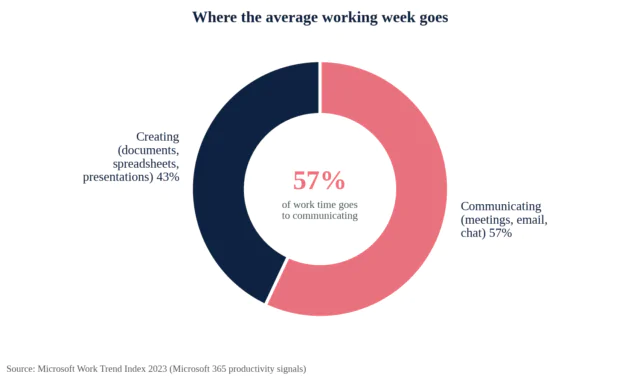
Across Microsoft 365 users, the average employee spends 57% of their time communicating in meetings, email and chat, and 43% creating documents, spreadsheets and presentations. The heaviest email users, the top 25%, spend 8.8 hours a week on email alone. That is more than a full working day.
These figures cover employees at companies of every size, not small business owners specifically. But in a small business, every email, question and approval tends to flow through one person. That usually makes the load heavier, not lighter.
Why the inbox costs more than the time you spend in it
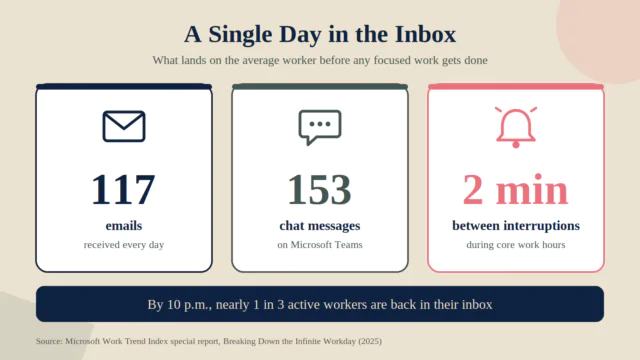
Microsoft’s 2025 data shows the average worker receives 117 emails and 153 Teams messages a day, and is interrupted every two minutes during core hours. By 10 p.m., nearly a third of active workers are back in their inbox.
The bigger cost is the restart. A Harvard Business Review study of 137 people across three Fortune 500 companies found workers switched between apps and websites about 1,200 times a day. That added up to just under four hours a week spent getting reoriented, or roughly five working weeks a year.
Put that in small-business terms. If you run a five-person company and you approve the quotes, answer the client questions and confirm the appointments, you are not just losing the minutes those messages take. You are losing the uninterrupted hours that only the owner can use well.
This is where the real damage happens for an owner. Pricing a proposal, planning a campaign or calling a key client needs long stretches of attention. An inbox that pings every two minutes quietly makes sure those stretches never happen.
How to find your own biggest time drain
Your biggest drain might be scheduling, reporting or chasing payments instead. The only way to know is to measure one normal week.
- Log every task for five working days. Note what it was and roughly how long it took, including quick replies.
- Count interruptions, not just hours. Ten five-minute replies scattered across a morning cost more focus than one 50-minute block.
- Mark each task “needs me” or “needs a rule.” If a task could follow a written rule, it does not need you.
- Pick the biggest “needs a rule” task. For most owners, that is the inbox.
What most owners get wrong about fixing email
- Inbox zero challenges. Clearing the inbox feels productive, but it keeps you as the person processing everything.
- More tools. Filters, labels and apps help, but someone still has to decide what each message needs.
- Checking less often without a plan. Batching email works until an urgent client message sits unanswered for three hours.
The underlying problem is ownership. As long as every message has to pass through you, the inbox keeps winning. It is the same pattern behind the hidden cost of being the bottleneck in your business.
What actually works: the four-bucket inbox system
The fix is to give someone else a clear set of rules. A simple way to do that is to sort every message into one of four buckets.
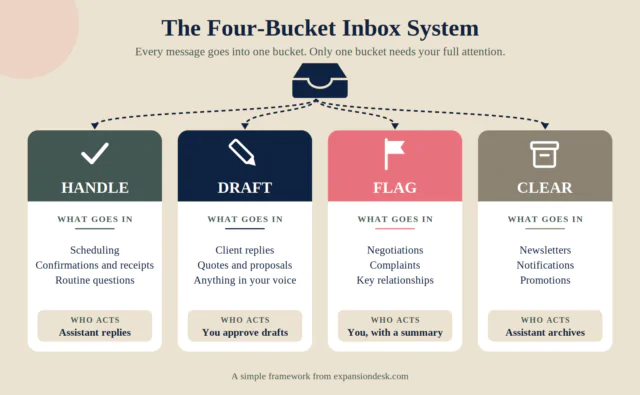
| Bucket | What goes in it | Who acts |
|---|---|---|
| Handle | Scheduling, confirmations, receipts and routine questions with known answers | Assistant replies directly |
| Draft | Client replies and quotes that need your voice | Assistant drafts, you approve |
| Flag | Negotiations, complaints, key relationships and anything sensitive | You, with a short summary |
| Clear | Newsletters, notifications and promotions | Assistant archives or unsubscribes |
The buckets matter more than the tool. Whether you use Gmail, Outlook or a shared help desk, the goal is the same: most messages get handled without ever reaching you, and the ones that do arrive with context and a suggested reply.
Once the rules are written down, a trained assistant can work through the inbox a few times a day and send you a short summary of what needs you. Inbox and calendar management sits at the heart of executive assistant services, and it is often the easiest first handover.
What this looks like in practice
The example below is a hypothetical scenario to illustrate the process. It is not a real client.
Daniel runs a four-person property management company. He checks email from 6 a.m., and most of it is tenant scheduling, vendor confirmations and invoice reminders.
He writes down his four bucket rules and gives his assistant delegated access. The assistant handles scheduling and confirmations, drafts replies to property owners for his approval and flags anything involving disputes. Daniel now reads a summary twice a day instead of living in the inbox, and his mornings go to growing the portfolio.
Nothing else about his business changed. The same emails still arrive. They simply stop landing on the one person whose time is hardest to replace.
How to hand over your inbox safely
- Use delegated access, not your password. Gmail and Outlook both let you give another person access to your mailbox without sharing your login.
- Write your four bucket rules on one page, with a real example for each.
- Create reply templates for the questions you answer every week.
- Start with drafts only. Let the assistant draft replies for the first couple of weeks before sending on your behalf.
- Agree on a daily summary of what was handled, what is drafted and what needs you.
- Review the rules weekly and adjust as you go.
If you are still deciding whether outside help makes sense at all, start with is hiring a virtual assistant worth it.
Frequently asked questions
What task takes up the most time for small business owners?
For most owners it is managing the inbox and messages. Research from Microsoft shows communication takes 57% of the average employee’s time, and business owners often carry even more of it because every decision flows through them.
How much time do people spend on email each week?
It varies widely, but Microsoft’s data shows the heaviest 25% of email users spend 8.8 hours a week on email. Frequent interruptions add more lost time on top, because every switch takes time to recover from.
Can a virtual assistant manage my email inbox?
Yes. With clear rules, an assistant can sort messages, handle scheduling and routine replies, draft responses for your approval and flag anything that needs you. Most owners start with drafts only and expand from there.
Is it safe to give a virtual assistant access to my email?
It can be, if you use the right setup. Gmail and Outlook both offer delegated access, so you never share your password. Combine that with written rules on what the assistant can send, and remove access when the work ends.
Can AI tools manage my inbox instead of a person?
AI tools can sort, summarize and draft, which saves real time. But someone still has to judge tone, spot what is urgent and take responsibility for the reply. This comparison of AI agents and virtual assistants breaks down where each one fits.
How do I find which task is costing me the most time?
Log every task for one normal working week, including quick replies and interruptions. Then mark each task as “needs me” or “needs a rule.” The biggest “needs a rule” task is your best candidate to hand over first.
What to do next
Run the one-week audit. If the inbox comes out on top, it is not a discipline problem. It is a job that needs an owner, and that owner does not have to be you.
Expansion Desk helps business owners hand off inbox, calendar and other recurring work to trained assistants. See how a virtual assistant for small business can fit into your week.
Ready to set up your first inbox rules? Book a free discovery call and talk through what to hand over first.
Sources
- Microsoft WorkLab, Work Trend Index 2023: Will AI Fix Work? microsoft.com/worklab
- Microsoft WorkLab, Work Trend Index Special Report: Breaking Down the Infinite Workday (2025). microsoft.com/worklab
- Murty, Dadlani and Das, How Much Time and Energy Do We Waste Toggling Between Applications? Harvard Business Review, August 2022. store.hbr.org

- What Nobody Tells You Before You Hire Your First Virtual Assistant - October 5, 2026
- 5 Signs You Are the Bottleneck in Your Own Business - October 1, 2026
- The One Task Costing You the Most Time Every Week (and How to Fix It) - September 30, 2026