

You close the laptop tired, the inbox is clear, and the one job that mattered, the proposal or the pricing call, is still untouched. Most owners blame discipline. The more common problem is that they cannot say where the hours went. Before you buy another app or look into virtual assistant staffing, run a time audit. This guide gives you a five day method, a free template and a simple way to decide what to keep, hand off or drop.
The short answer
- A time audit is a five day log of what you actually do, tagged so each task can be kept, batched, handed off or dropped.
- Memory is a weak measuring tool. U.S. time diary research shows people tend to overestimate their work hours, and the gap grows as the claimed hours rise.
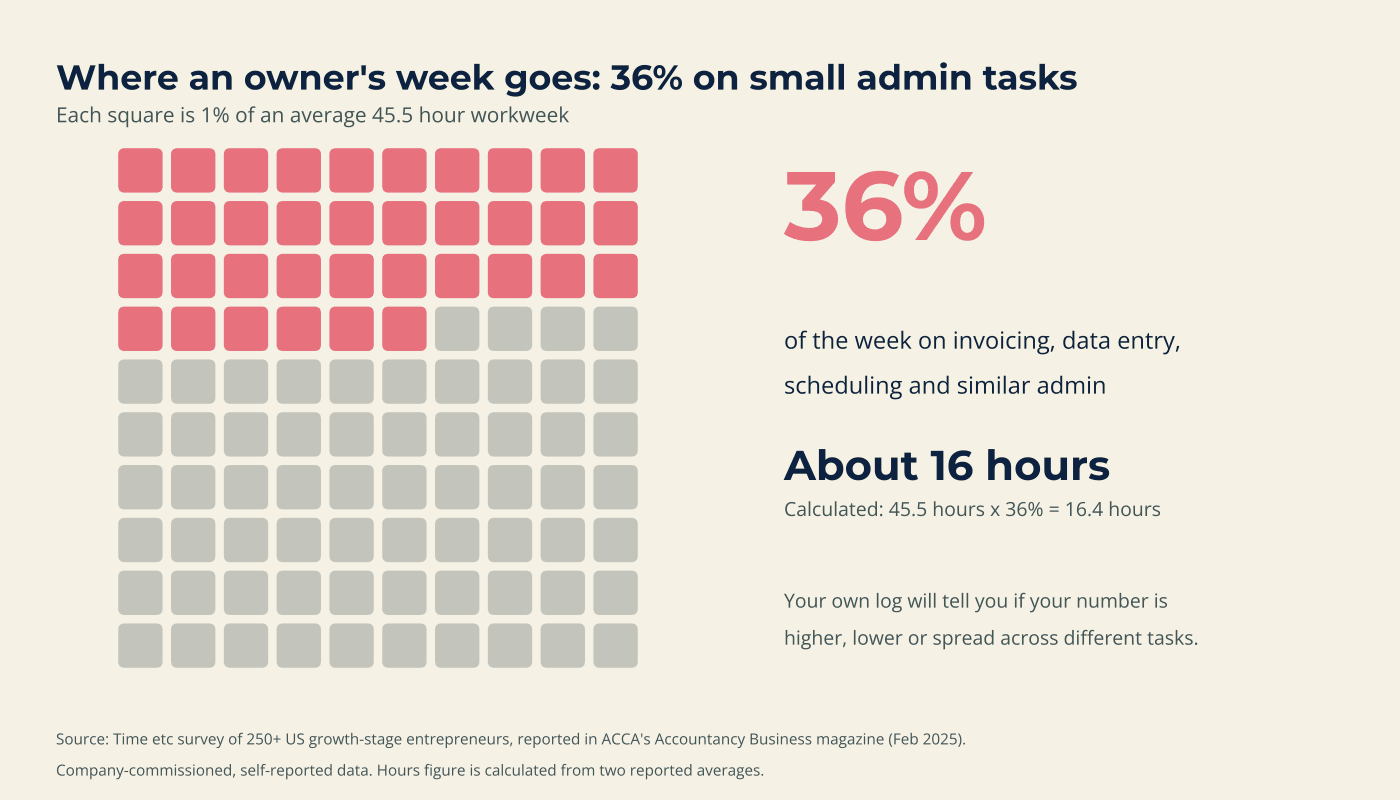
- One survey of growth-stage entrepreneurs put small admin tasks at 36% of a 45.5 hour week, about 16 hours. Your number may be very different.
- The audit only pays off if the freed hours go somewhere on purpose.
What is a time audit, and how do you do one?
A time audit is a short, honest record of how you spend your working hours. Log every task for five working days, tag each one by whether it needs your judgment and whether it repeats, total the hours by category, then decide what to keep, batch, hand off or drop. The log, not your memory, becomes your evidence.
You do not need special software. A spreadsheet, a notes app or the template below is enough. It is a one week snapshot, not a forever habit.
Why guessing your week does not work
A 2011 Bureau of Labor Statistics analysis of U.S. and Belgian time diary data found that people estimated their work hours 5 to 10 percent higher than their own diaries showed, and the more hours they claimed, the bigger the gap. It covers workers in general, not owners, and the data is older. The lesson still holds: a log beats a feeling.
What fills the hours matters more than how many there are. A survey of more than 250 growth-stage entrepreneurs, run by the virtual assistant company Time etc, found owners spent 36% of a 45.5 hour week on small admin tasks such as invoicing and data entry. That is about 16 hours. The sample is small and company-commissioned, so read it as a signal, not a benchmark.
Interruptions add a hidden cost. Research by Gloria Mark at the University of California, Irvine found that interrupted workers took more than 23 minutes to get back to the original task, and 44% of interruptions were self-created. The studies cover office workers in the 2000s, so your own numbers will differ. That is why the template has an Interrupted column.
The five day time audit, step by step
Pick a normal week, not a holiday or a launch. Then follow these five steps.
Step 1: Set up your log
Download the free time audit template (Excel) or copy the columns below into any spreadsheet. The template includes a log, an automatic summary, an example week and a page to price your hour.
| Column | What to write |
|---|---|
| Start and end | The times you began and stopped |
| What I did | A few words, with no client names |
| Category | One of six to eight broad buckets, such as client work, sales, email, scheduling and finance |
| Needs my judgment? | Yes or No |
| Repeats weekly? | Yes or No |
| Energy and interrupted | Gives, neutral or drains. Yes if something broke your focus |
Step 2: Log as you go
Add a line each time you switch tasks, not at the end of the day. Round to five minutes. Count the quick things: a two minute reply is a task, and so is checking orders on your phone. If you miss a stretch, mark it unknown rather than guessing.
Step 3: Tag three things
For every line, ask three questions. Would a smart new hire get this right from written instructions? If yes, it does not need your judgment. Did I do this last week too? Did it give me energy or drain it? These tags matter more than the minutes.
Step 4: Total it on Friday
Add up hours by category, count the interruptions and note what drained you. Look first for the biggest surprise, not the biggest category. The Summary sheet does the arithmetic.
Step 5: Price your hour
Estimate what an hour of your focused time is worth when spent on sales, clients or planning, then compare it with what a routine task costs to move off your plate. For context, the Bureau of Labor Statistics reports a median wage of $23.23 an hour for U.S. secretaries and administrative assistants (May 2025). That is a wage, not the full cost of employing someone, but it frames the comparison.
Sort every task with the Keep, Batch, Hand off, Drop matrix
Two answers decide where each task lands: does it need your judgment, and does it repeat?
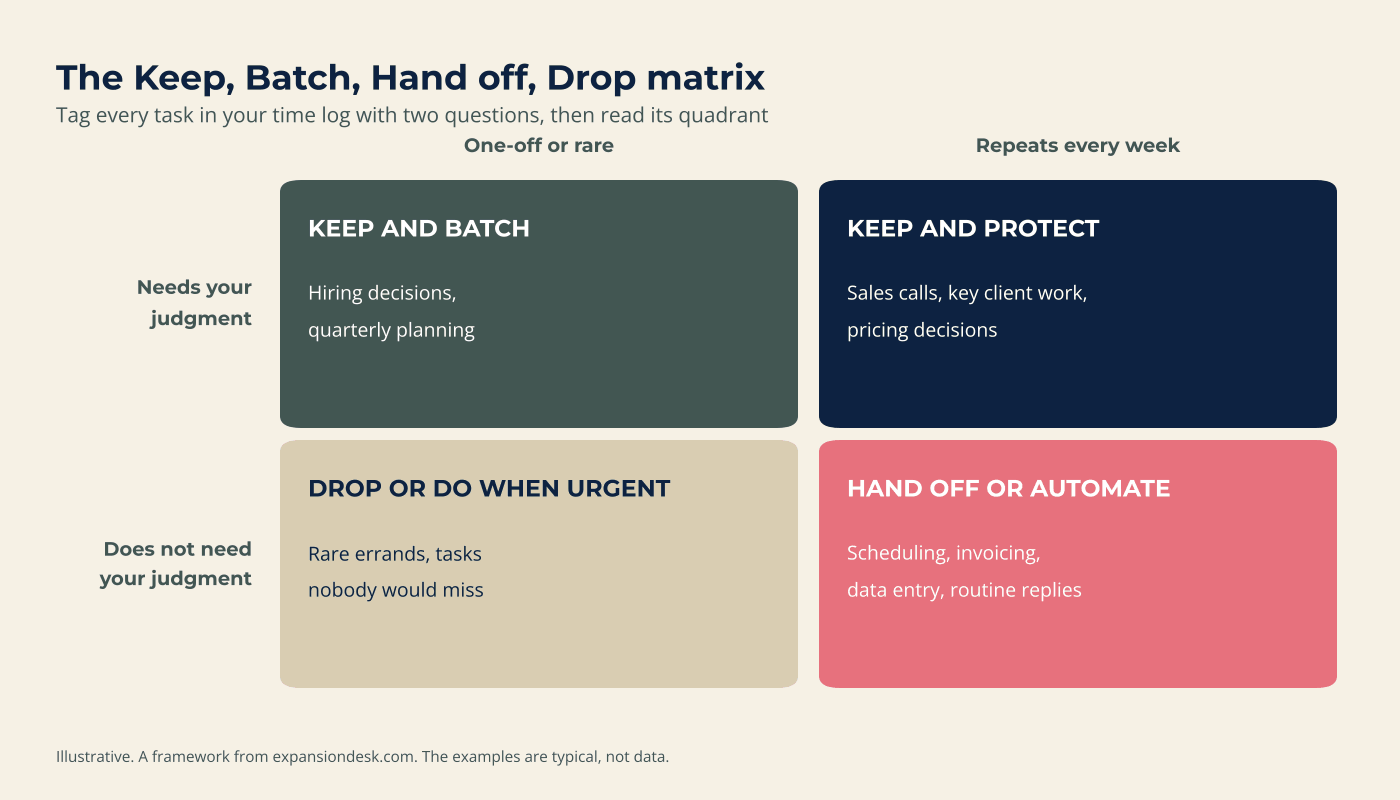
- Keep and protect (judgment, repeats): sales calls and key client work. Block these in your calendar first.
- Keep and batch (judgment, rare): hiring decisions and quarterly planning. Give them one or two set times.
- Hand off or automate (no judgment, repeats): scheduling, invoicing, data entry and routine replies. This is where hours come back.
- Drop or do when urgent (no judgment, rare): delete it, or do it only when it becomes urgent.
If email tops your log, the four bucket system in this inbox guide is a good first fix.
A hypothetical example of what an audit shows
The example below is a hypothetical scenario to illustrate the process. It is not a real client.
Marcus owns a four person landscape design studio. His log covers 47 hours.
| Category | Hours | Decision |
|---|---|---|
| Client design work | 16 | Keep and protect |
| Sales calls and proposals | 6 | Keep and protect |
| Email and messages | 8 | Hand off routine replies |
| Scheduling and rescheduling | 4 | Hand off or automate |
| Invoicing and payment chasing | 4 | Automate reminders, hand off entry |
| Bookkeeping entry | 3 | Hand off |
| Social posts | 3 | Batch monthly, then hand off |
| One-off supplier research | 3 | Drop or do when urgent |
| Total | 47 |
Twenty-two of Marcus’s 47 hours are routine work that does not need him: email, scheduling, invoicing, bookkeeping and social posts. He does not move all of it at once. He starts with the two biggest, email and scheduling, and reviews after a month. He also expects an hour or two a week of checking the work, so his net gain is smaller than the gross.
What to do with the hours you find
Routine work has two homes: tools and people. Bluevine’s April 2026 survey of 942 U.S. small business owners found that nearly half of respondents said AI saves them about four hours a week or more. The result is self-reported and comes from a company that sells to small businesses, so treat it as a signal. Tools suit pure rules, such as payment reminders. People suit work that needs context, such as client replies. This comparison of AI agents and virtual assistants shows where each one fits.
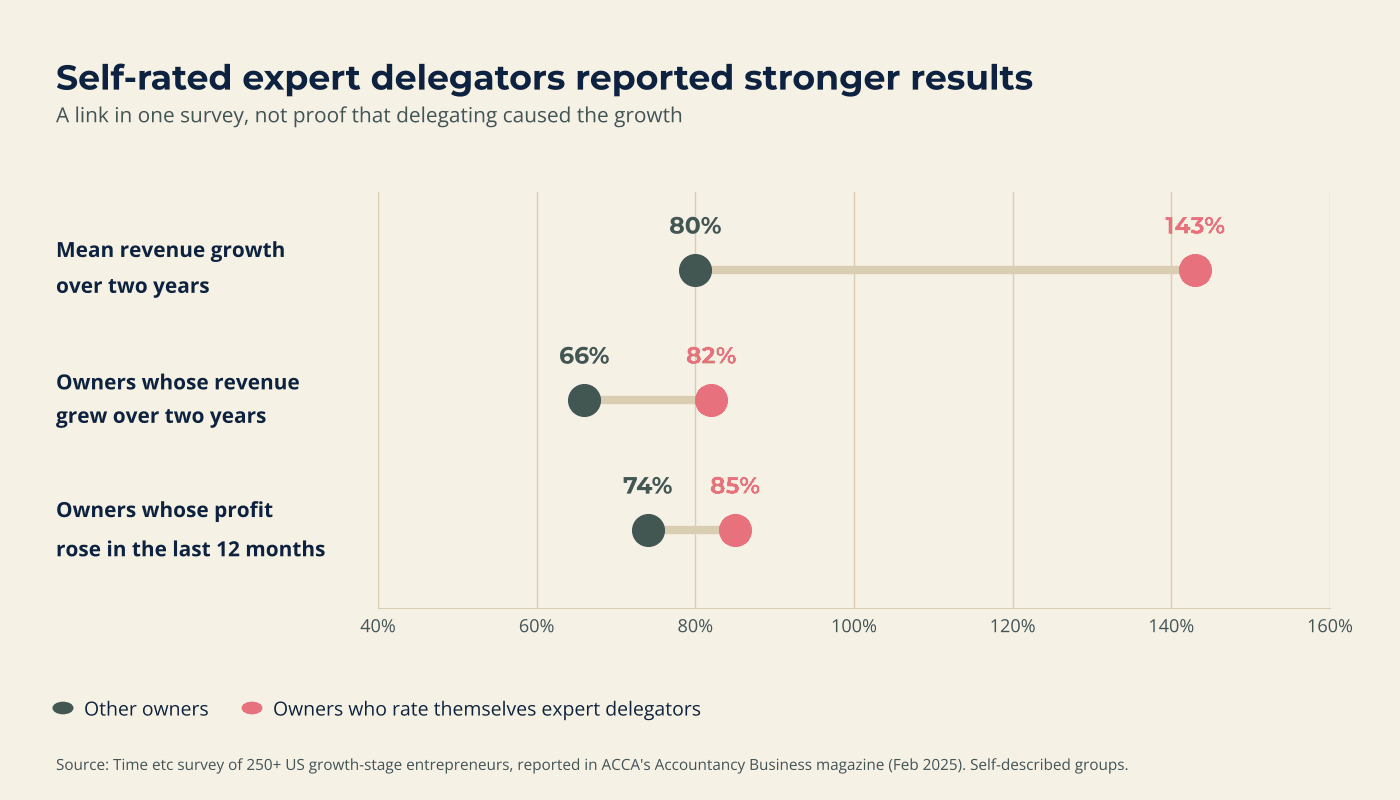
Handing work off also shows up in growth data. In the same Time etc survey, owners who rated themselves expert delegators reported mean revenue growth of 143% over two years, against 80% for the rest, and 85% saw profit rise against 74%. The groups are self-described and this is not a controlled study. It shows a link, not proof that delegating caused the growth.
Decide where the freed hours go before you free them. Put sales calls, client time or planning in the calendar first. One worked example of the arithmetic shows how an owner could get roughly 15 hours a week back, including the time spent managing the handover.
When a time audit is not the right move
A time audit is useful, not universal. Skip it, or shrink it, in these cases:
- You are in a cash or staffing emergency. Fix the emergency first and audit afterwards.
- Your week is mostly judgment work. If routine tasks add up to only a few hours, templates and batching may beat a handover.
- The real limit is demand, pricing or product. An audit will not create customers.
- You will not act on the results. A log you never read is just a chore.
- You are not ready to let go. The log is still worth doing. Take this delegation readiness check before you hand anything over.
If five days feels too heavy, log three and treat the results as partial.
Frequently asked questions
How long should a time audit take?
Five working days is enough for most owners. Log a second week if your work is seasonal or the first week was unusual. The logging itself should take only a minute or two per entry.
What is the best way to track time as a business owner?
Write a line each time you switch tasks, in a spreadsheet or the template above. The method matters more than the tool, so use whatever you will actually keep open.
What categories should I use for a time audit?
Start with six to eight broad ones, such as client work, sales, email and messages, scheduling, finance, marketing and admin. They should be broad enough that you can tag a task in a few seconds.
How do I know what to delegate after a time audit?
Look for tasks that repeat, follow rules and do not need your judgment. Those land in the hand off quadrant of the matrix. Start with the one or two that take the most hours.
Is a time audit worth it if I only do a few hours of admin a week?
Often a short one is enough. If routine work adds up to only a few hours, small fixes such as templates, batching and saved replies may help more than a handover.
Can I use AI to run my time audit?
AI can help sort and summarize your log, but the log itself must come from what you actually did. Do not paste confidential client details into a tool you have not checked.
What to do next
Expansion Desk matches business owners with vetted, trained assistants, with a dedicated onboarding support team to help the handover happen in stages. If your log shows hours of routine work, see how a virtual assistant for small business could take on the first tasks.
Want a second pair of eyes on your numbers? Book a free discovery call and bring your completed log.
Sources
- U.S. Bureau of Labor Statistics, Monthly Labor Review, The overestimated workweek revisited (June 2011). https://www.bls.gov/opub/mlr/2011/06/art3full.pdf
- Accountancy Business (ACCA), Barnaby Lashbrooke, Delegate for small business growth (February 2025), reporting a Time etc survey of more than 250 entrepreneurs. https://abmagazine.accaglobal.com/global/articles/2025/feb/careers/delegate-for-small-business-growth.html
- UC Irvine, California Institute for Telecommunications and Information Technology, Working faster, managing more (Gloria Mark research). https://www.calit2.uci.edu/2011/08/08/post-workingfastermanagingmore/
- U.S. Bureau of Labor Statistics, Occupational Outlook Handbook, Secretaries and Administrative Assistants (May 2025 data). https://www.bls.gov/ooh/office-and-administrative-support/secretaries-and-administrative-assistants.htm
- Bluevine, 2026 Small Business AI Trends Report (survey by Centiment, April 7 to 9, 2026, 942 U.S. owners). https://www.bluevine.com/blog/small-business-ai-trends-report-2026

- How to Do a Time Audit as a Business Owner (Free Template) - November 11, 2026
- Everyone Is Talking About AI Taking Over Small Business, Here Is What Is Actually True - November 4, 2026
- What Successful Business Owners Do Differently When They Scale - November 4, 2026