

You finally made the call. The first assistant starts Monday, and you are already picturing your inbox empty and your evenings back.
Then week one arrives, and it feels slower than doing everything yourself. Most owners who reach out to a virtual assistant agency are never told that part, and it is exactly where many first hires go wrong.
This guide covers the seven things nobody mentions before your first virtual assistant starts, plus a realistic 90-day plan so the hire actually pays off.
Executive summary
- Most onboarding is weak. Gallup found only 12% of employees strongly agree their organization does a great job onboarding new people.
- The first weeks are an investment, not a shortcut. Expect to spend more time explaining before you start saving time.
- Your processes probably live in your head. Writing them down is the real first task, and it helps the whole business.
- Security is your job on day one. Verizon found a third party was involved in 48% of breaches in its 2026 report, up from 15% two editions earlier.
- The payoff usually shows up in month two or three. Judge the hire at 30 days, not after week one.
What should you know before hiring your first virtual assistant?
Before hiring your first virtual assistant, know that the first few weeks take more of your time, not less. You will need written processes, secure access, a daily check-in rhythm and a clear way to judge results. Owners who plan for that ramp-up see the time savings. Owners who expect instant relief often quit too early.
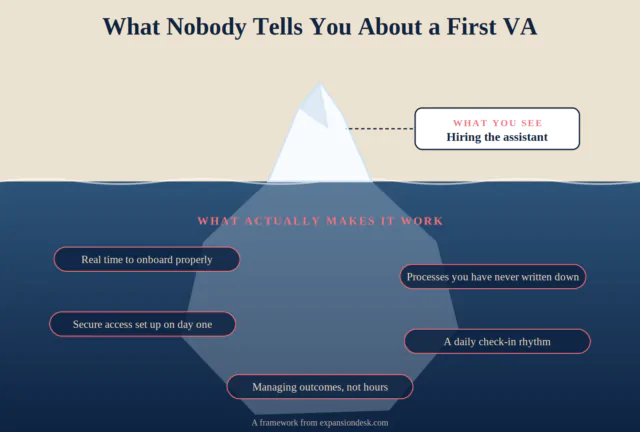
7 things nobody tells you before your first VA
1. The first two weeks will feel slower
Explaining a task takes longer than doing it yourself, at least the first time. That is normal, and it is the price of never having to do that task again. In week one you are not buying hours. You are building a system that runs without you by week ten.
Most businesses underestimate this. Gallup found only 12% of employees strongly agree their organization does a great job onboarding, and only 29% of new hires feel fully prepared and supported afterwards. A first VA in a small business usually gets even less structure.
2. Your processes are messier than you think
You know how to send a quote or book a client call without thinking. Writing it down for someone else is where you discover the missing steps, the exceptions and the “it depends” moments. That documentation is also one of the most valuable things you will create this year, because anyone you hire next can follow it too.
What to do: record yourself doing each task once and turn it into a short checklist. This guide to building a delegation system shows how to keep that documentation growing.
3. Access and security are your responsibility
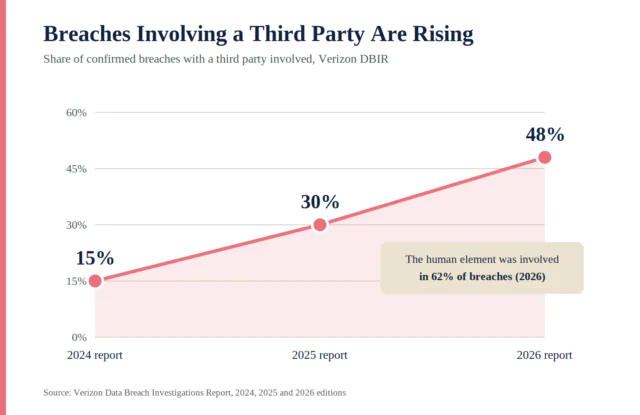
Verizon’s Data Breach Investigations Report found a third party was involved in 48% of breaches in its 2026 edition, up from 30% the year before and 15% the year before that. The human element was involved in 62% of breaches.
That is not a reason to avoid outside help. It is a reason to set access up properly: a password manager instead of shared logins, multi-factor authentication on every account, the minimum permissions each task needs and a plan to remove access when work ends.
4. You will manage outcomes, not hours
Watching someone’s screen does not tell you whether the work is good. Define what “done” looks like for each task, such as a reply sent within a set time or a CRM updated by end of day, and review results instead of activity. For example, instead of asking how long the inbox took, ask whether every client email got a reply the same day and whether anything urgent was flagged. Those questions take two minutes to answer at the end of the day.
5. Start smaller than you want to
It is tempting to hand over everything at once. Resist it. Start with three to five recurring, low-risk tasks, usually inbox, calendar and data entry, and add more only when those run without you. Inbox and calendar support is the core of executive assistant services, which is why it is a common first handover. A short list also makes problems easy to spot: if one task keeps going wrong, the fix is usually a clearer checklist, not a different assistant.
6. The check-in rhythm matters more than talent
A skilled assistant with no clear feedback will drift. A good assistant with a simple daily check-in will improve every week. Gallup found employees are 3.4 times as likely to rate onboarding as exceptional when their manager takes an active role. As a first-time employer of a VA, that manager is you. The check-in does not need to be long. Three questions are enough: what got done, what is stuck and what needs a decision from you.
7. The real payoff shows up in month two or three
Week one is setup. Weeks two to four are drafts, checks and corrections. By month two, routine work usually runs with you reviewing rather than redoing. Owners who judge the hire on week one often give up right before it starts working. Set your first proper review at 30 days, and judge it against the checklists you wrote.
Your first 90 days with a virtual assistant
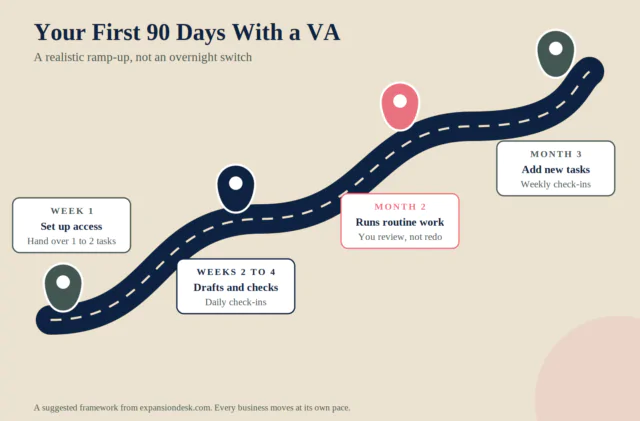
Here is what a realistic first quarter usually looks like when the groundwork is done.
| Stage | What the assistant does | What you do |
|---|---|---|
| Week 1 | Gets access, learns tools, completes one or two simple tasks | Share checklists and recordings, answer questions |
| Weeks 2 to 4 | Drafts work and handles routine tasks with your review | Daily 15-minute check-in, correct and update the checklist |
| Month 2 | Runs routine work independently | Review results, not every step |
| Month 3 | Takes on new tasks | Weekly check-in, plan the next handover |
This is a suggested framework, not a guarantee. Some businesses move faster, and complex roles take longer.
What this looks like in practice
The example below is a hypothetical scenario to illustrate the process. It is not a real client.
Elena runs a five-person bookkeeping practice. In week one she feels her new assistant is slowing her down, because every task needs explaining. She keeps going, records each process once and holds a 15-minute check-in every afternoon.
By week four, client scheduling and document collection run with only a quick review. By month two, she stops checking every email and starts using the time for new client calls. The assistant did not get dramatically better overnight. The system around them did.
When a first virtual assistant is not the right move
- You cannot spare any time in the first month to explain how things work.
- Your tasks change daily with no repeatable pattern.
- You need a senior decision-maker, not support.
- You handle regulated data and have no access or privacy process in place yet.
In those cases, fix that gap first, then hire. A first VA works best when there is a clear, repeatable job waiting for them.
If you are still weighing whether outside help makes sense at all, start with is hiring a virtual assistant worth it.
Checklist before your first VA starts
- List three to five recurring tasks you will hand over first.
- Record each task once and write a short checklist.
- Set up a password manager and MFA before day one.
- Decide how you will measure done for each task.
- Book a daily 15-minute check-in for the first month.
- Plan a 30-day review to decide what to add next.
Frequently asked questions
What should I know before hiring my first virtual assistant?
Expect the first few weeks to take more of your time, not less. You will need written processes, secure access, a daily check-in and clear measures of success. The time savings usually show up in month two or three.
How long does it take a virtual assistant to get up to speed?
It depends on your documentation and the complexity of the work. Simple, well-documented tasks can be handed over within the first few weeks, while work that relies on your judgment takes longer.
What tasks should I give my first virtual assistant?
Start with three to five recurring, low-risk tasks that are easy to check, such as inbox triage, calendar management, data entry and follow-ups. Keep pricing, key relationships and hiring decisions with you.
How do I give a virtual assistant access safely?
Use a password manager instead of sharing logins, turn on multi-factor authentication, give only the permissions each task needs and remove access as soon as the work ends.
Should I hire a freelancer or go through an agency for my first VA?
It depends on how much screening, training and backup you want to handle yourself. This comparison of virtual assistant vs in-house hire vs freelancer walks through the trade-offs.
What is the biggest mistake first-time VA employers make?
Judging the hire too early. Many owners expect instant relief, feel slower in week one and give up before the assistant has had time to learn the work.
What to do next
Pick your first three tasks, record them once and book the check-ins before the start date. That preparation decides more than any hiring decision you make.
Expansion Desk matches business owners with vetted, trained assistants and has a dedicated support team for onboarding, so the first 90 days do not fall on you alone. See how a virtual assistant for small business can fit your first handover.
Planning your first hire? Book a free discovery call and talk through which tasks to start with.
Sources
- Gallup, Why the Onboarding Experience Is Key for Retention. gallup.com
- Verizon, 2026 Data Breach Investigations Report, as summarized by eSecurity Planet. esecurityplanet.com
- Verizon, 2025 Data Breach Investigations Report press release. globenewswire via seekingalpha.com

- What Nobody Tells You Before You Hire Your First Virtual Assistant - October 5, 2026
- 5 Signs You Are the Bottleneck in Your Own Business - October 1, 2026
- The One Task Costing You the Most Time Every Week (and How to Fix It) - September 30, 2026